A team I support couldn’t see the state of their own tickets.
Not just their own individual requests. The team lead had no way to see what anyone on the team had opened, what was stuck, or what had quietly gone stale. Someone would file a request, get a confirmation email, and that was it. No shared view, no way to check status, no way for a lead to know their team was even carrying an open issue until it became a problem. The only signal anyone got was another email when a ticket eventually closed, and even that only went to whoever opened it.
The ticketing platform behind all of this runs on strict least-privilege access. You see exactly what you’re provisioned for, and nothing else. Hundreds of teams, sensitive ticket contents, a shared system. That’s the correct default. But it also meant a team with a completely reasonable need, basic visibility into their own team’s work, had no path to it without someone granting a new permission.
So the request came in the obvious shape: can we get access to the ticketing tool.
It would have worked. A new grant, a new license per person, a slightly wider permission surface on a system that’s deliberately narrow for good reasons, and a multi-week approval path for something that shouldn’t take that long. I almost just submitted the request myself. I got as far as opening the form.
What stopped me wasn’t caution. It was noticing that “access to the tool” and “a shared view of the team’s tickets” are two different problems, and I was about to solve the expensive one because it was the first one I thought of.
Nobody needed a seat in the ticketing system. They needed a live, shared view: every ticket the team had open, who opened it, what state it was in, updated automatically as things changed, so a lead didn’t have to rely on someone remembering to mention it in standup. That’s a much smaller ask, and it turns out it has a much smaller answer.
The right fix for “I can’t see X” is not always “give me access to X.” Sometimes it’s a narrower, purpose-built view of X that never touches the original system’s permission boundary at all.
what they actually needed to see
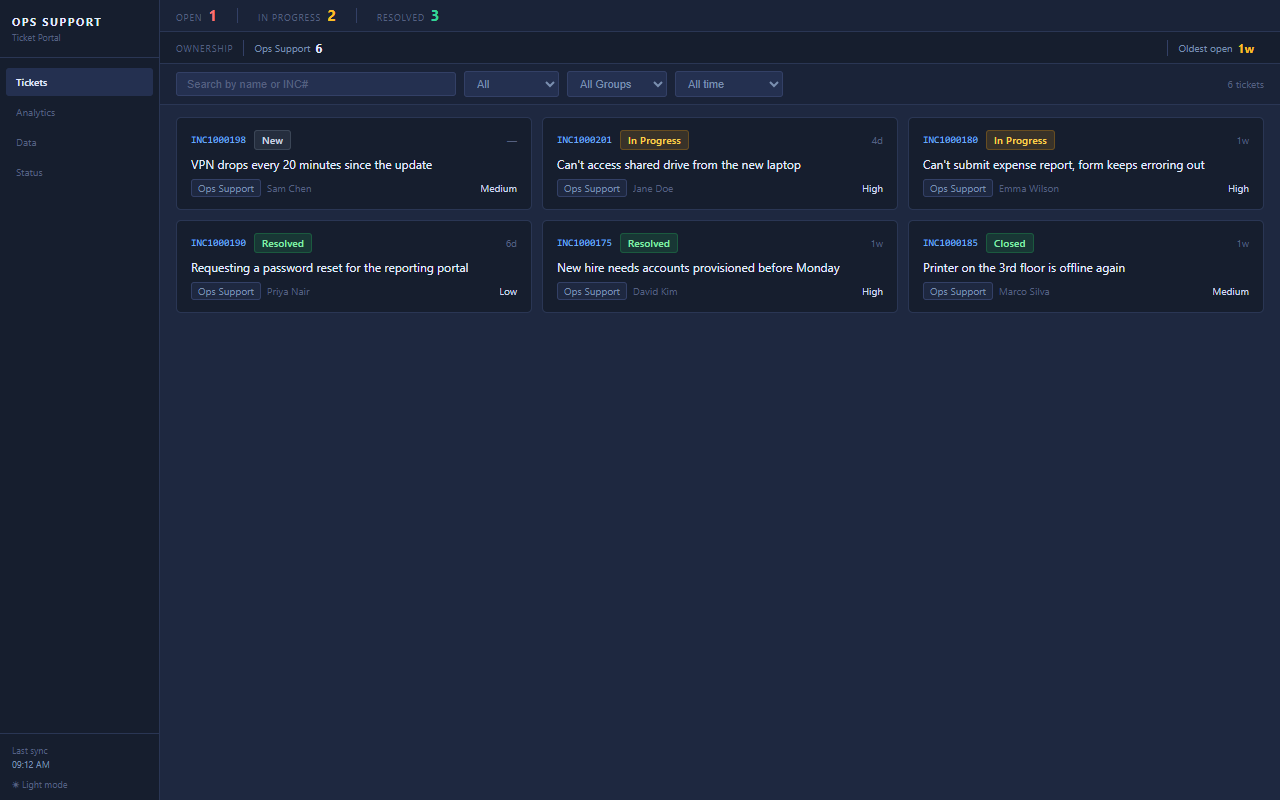
The whole thing is one screen: every ticket the team owns, who filed it, what state it’s in, filterable, and current. Not a seat in the ticketing tool. A window onto one authorized slice of it.
the architecture
Most ITSM platforms already support scheduled exports: a report that runs on a timer and emails a CSV somewhere. That’s not a workaround, it’s a feature the tool ships with. I pointed one of those at a small pipeline that republishes just that authorized slice, every ticket belonging to the team, through a completely separate channel, with its own separate access control.
In plain terms: a managed email service receives the export and drops the raw message into an encrypted bucket. A small function picks it up, parses the attachment, validates it, and writes a clean copy into a second, private bucket, archiving a timestamped version for audit as it goes. A content-delivery layer serves a static site out of that private bucket, sitting behind an edge firewall rule that only lets a specific set of office and VPN IP ranges through. Everything else gets blocked before it reaches storage.
No server to patch. No compute running while nothing’s happening. The whole thing sits at zero cost between report runs and only spins up when a new email actually shows up.
what broke on the way
Three things broke while I was building this, and none of them showed up until I actually ran it. Writing them down because they’re the kind of thing you only learn by shipping.
The bucket policy that lets the mail service write into storage was scoped to the exact identifier of the rule using it. Except the mail service checks write access before that rule exists, at creation time. First deploy failed with a permissions error that made no sense until I realized the policy pointed at something that hadn't been created yet. The fix, scope to the account instead of the rule, is also the pattern the docs recommend. I'd skipped past it the first time.
The private bucket uses a customer-managed encryption key instead of the provider's default. The delivery layer's bucket policy correctly let it read files. The firewall correctly let requests through. And it still came back 403. Granting bucket-level read access says nothing about the key that encrypts the bucket's contents, and the delivery layer needed its own explicit permission on that key. Two separate doors. I'd only unlocked one.
I'd built the dashboard against a guessed set of column names before the real export ever arrived. When it did, half the fields I'd mapped didn't exist, and the one field that actually identifies who opened a ticket was sitting under a name I hadn't guessed at all. Fix: stop guessing. The pipeline now accepts whatever columns show up, the frontend renders all of them, and the handful of fields the charts specifically care about degrade quietly instead of throwing when one is missing.
results
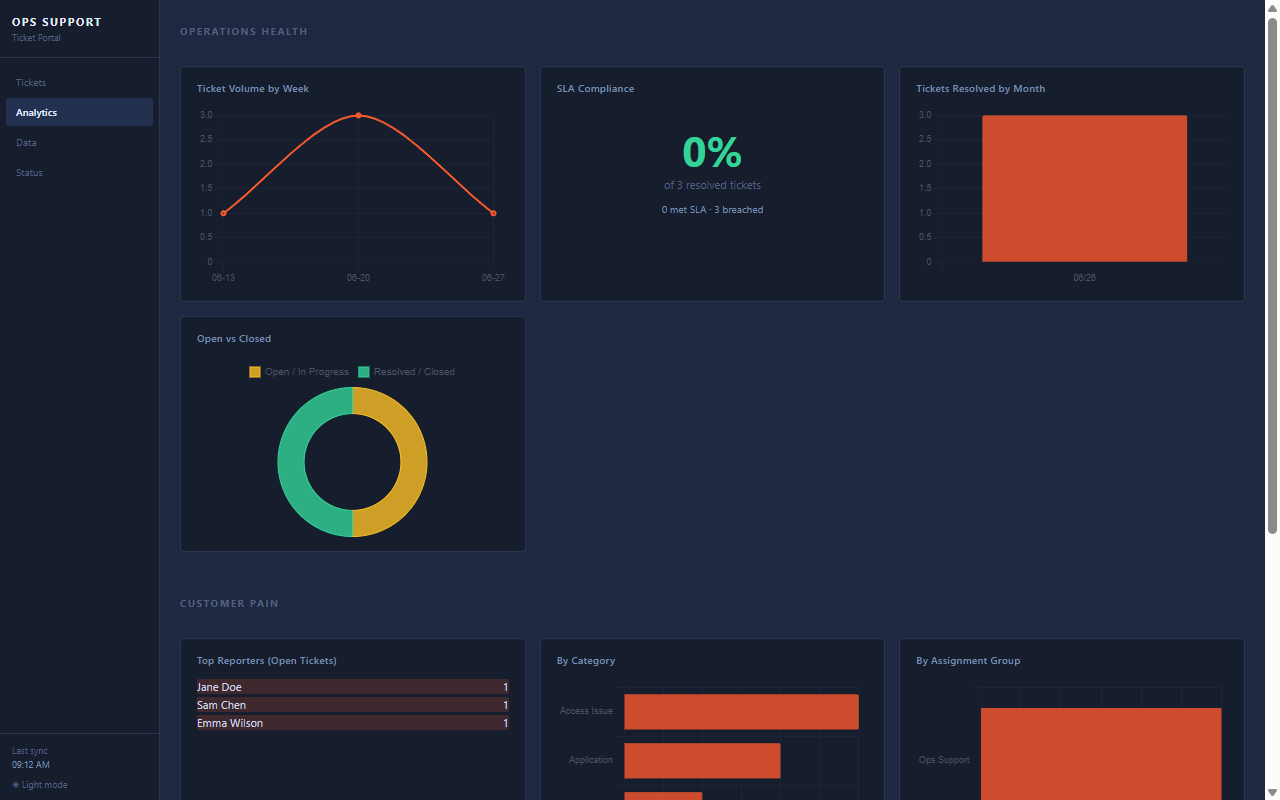
The team lead got a live, shared view of everything the team had open: who filed it, who it’s assigned to, what state it’s in, updated automatically. Zero new permissions granted anywhere in the ticketing tool. On top of the ticket list, the same data rolls up into an analytics view, volume, SLA, open-versus-closed, so a lead can see the shape of the week at a glance instead of counting rows.
It costs about ten dollars a month to run, tagged so the cost is easy to track, and one command away from being redeployed into a different account if it ever needs to move.
it reports on itself
A pipeline that runs unattended needs to say something when it breaks, not just go quiet. The processing function writes a small status record after every run, success or failure, and there’s a tab on the dashboard that reads it directly.
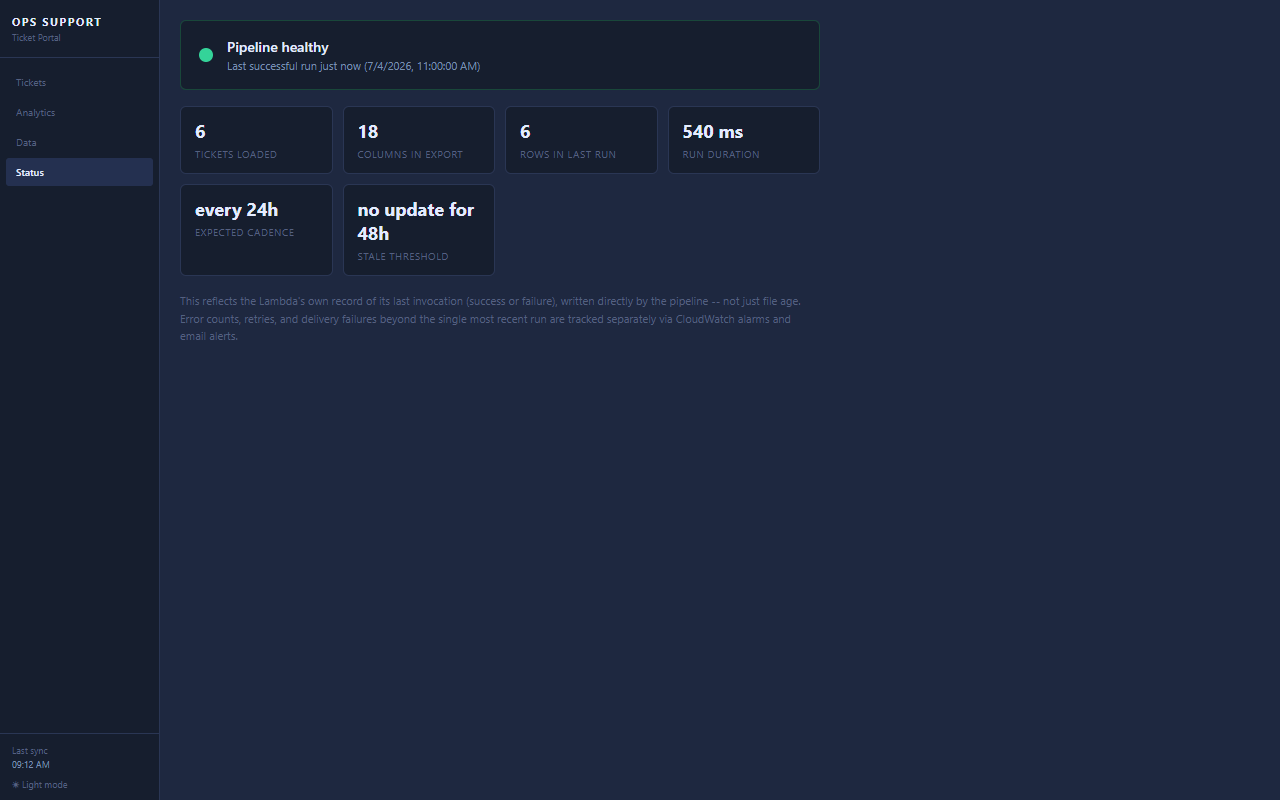
If the last run failed, it says so, with the actual error, instead of quietly going stale until someone notices the numbers haven’t moved. There’s also a scheduled alarm that fires if no successful run lands for twice the expected interval, on top of the per-run failure alerts. Belt and suspenders, for something with no other on-call watching it.
the actual lesson
None of this was hard engineering. Every piece, email ingestion, a small function, private storage, a static site behind a firewall rule, is a well-worn pattern. The only real decision was refusing the first answer to the original question. “Give them access” would have shipped too, eventually, at a permanent cost to a system that’s locked down on purpose.
The better question was never “how do we get them access.” It was “what does the team actually need to see, and what’s the smallest thing that shows them exactly that and nothing more.” I’ve started asking that question about every access request that’s crossed my desk since, and most of them turn out to have the same shape once you look.